Generating Small WASM Modules
WebAssembly
For small web projects like simple utilities and games, using WebAssembly is often seen as a quite heavyweight solution, both in terms of code size and program size. Apart from notable exceptions like Figma, WebAssembly has mostly been used as a way for big existing applications to retroactively target the web. To understand why, I will first give you some context about WebAssembly, then we’ll see that it doesn’t have to be this way. If you already know about WebAssembly feel free to skip to the experiment.
What
WebAssembly or WASM is a binary instruction set whose first specification was released in 2017. It was meant as an more efficient compilation target than JavaScript for programming languages targeting the web . In order to ship early, the first version of WASM had to make concessions and started as a target for languages that view memory as a single linear array, and for which JavaScript was not a great compilation target, like C, C++ and Rust (see WebAssembly’s post-MVP future by Lin Clark). WASM modules typically have their own isolated linear memory and cannot directly access memory outside of it. Like most physical ISA, this first version of WASM had instructions for manipulating numbers but no inherent knowledge of aggregate types, and no support for a capability system like CHERI. This means that a system using WASM modules has memory safety at the module instances boundary, but there is no internal memory safety inside of a WASM module.
The version of WASM which only supports linear memory is often called WASM v1, or WASM MVP (minimum viable product). WASM has since gained support for other memory models. A new set of instructions often refered to as WASM-GC was released recently to make WASM a better target for more programming languages and added a notion of aggregate types, typesafe references to aggregate types and references to objects outside of linear memory. Support for multiple, isolated linear memories is planned. Nowadays most browsers support running at least WASM with linear memory and the only mainstream browser still lacking support for WASM-GC is Safari. The current specification is available here.
In addition to C, C++ and Rust, a lot of programming languages have added or are currently adding support for compiling to WASM, like Dart, Scheme, Kotlin, Java, OCaml, Haskell, Go or .NET. Although WASM can be used outside of web browsers, the main goal of adding support for WASM is to be able to target the web. Most of these languages were not initially meant for use in websites and the most obvious way in which it manifests is in the size of the WASM modules they produce. As the WASM specification evolves to make it a better target for these languages (like wasm-gc which allows garbage collected languages to avoid shipping a garbage collector and generating stack root maps), and compilers and toolchains become more “web aware” the situation is likely to improve.
Why
Compared with JavaScript, WASM has more reliable performance. Nowadays most browsers JavaScript interpreters use JIT compilation and for some programs, when code is hot enough to be optimized by the JIT compiler, peak performance can approach that of WASM or even exceeed it when calls between WASM code and JavaScript are the performance bottleneck. However, in order to achieve such performance you will often have to write low level code that is close to what you would write in C but without the guarantee that a future version of the JIT or the JIT of another browser will generate acceptable performance. WASM compilers have a lot less work to do to generate efficient machine code for most systems so performance will be at least more predictible. For the same reason and the fact the WASM was designed to allow streaming compilation, WASM loads faster than JavaScript (see From Rust to beyond: The WebAssembly galaxy by Ivan Enderlin.)
Issues
Unlike JavaScript modules, WASM modules are not run automatically and they cannot directly access browser APIs. WASM modules need to be compiled and instanciated programmatically, and their functions called from JavaScript. In this sense, they are currently more like shaders of GPU programming APIs than a full JavaScript replacement, though there is a proposal to fix that. Since a lot of early adopters of WASM were already existing C, C++ and Rust applications, compilers like Emscripten and tools like wasm-bindgen and wasm-pack typically generate the JavaScript code to instanciate modules and access Browser API which is considered as boilerplate by developers not willing to deal with JavaScript. This and the fact that WASM modules produced by these tools are often bigger that what a similar module written in JavaScript would be can deter people from writting small wasm tools or games. If that is your case, let me try to change your mind.
Experiment
If you need your program to run in all current browsers including Safari, you cannot yet compile to WASM with WASM-GC. This means that any language that doesn’t have the same view on memory as WASM v1 (linear memory) is likely to produce large WASM modules. Languages that compile efficiently to WASM with linear memory include AssemblyScript, C, C++ and Rust. It is also possible to use WAT (WebAssembly Text format) directly and it’s quite interesting if you want to understand how it works under the hood.
If you are just experimenting with WASM for fun, Kotlin, Dart, Guile Hoot or Java (with J2CL) can compile to WASM-GC and produce modules smaller than 100ko which is decent but definitely not minimal.
To compare the output of various toolchains and techniques for small games let’s use a simple game as an experiment: snake. You can try it here.
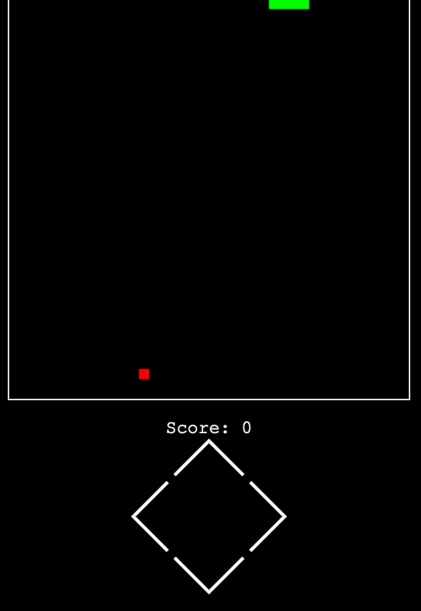
All ports of the game will have a similar structure. The full code is avalable here.
The HTML code will be quite simple. Just a square canvas and some buttons for mobile users:
<canvas id="canvas" width="400" height="400"></canvas>
<p id="score">Score: <span id="score-display">0</span></p>
<div id="buttons">
    <button id="up"></button>
    <button id="right"></button>
    <button id="left"></button>
    <button id="down"></button>
</div>
Let’s reference these elements from JavaScript:
const canvas = document.getElementById("canvas");
const scoreDisplay = document.getElementById("score-display");
const up = document.getElementById("up");
const left = document.getElementById("left");
const down = document.getElementById("down");
const right = document.getElementById("right");
const cx = canvas.getContext("2d");
let stepPeriod = 300;
WASM doesn’t have access to the DOM so we will have to expose some functions. These functions only take number arguments so that they can be converted easily to WASM and we don’t need to write type wrappers.
{
    canvas_set_fill_style(hexColor) {
        var color = "#" + hexColor.toString(16).padStart(6, "0");
        cx.fillStyle = color;
    },
    canvas_fill_rect(x, y, width, height) {
        cx.fillRect(x | 0, y | 0, width | 0, height | 0);
    },
    canvas_fill() {
        cx.fill();
    },
    snake_score_change(score) {
        scoreDisplay.textContent = score;
    },
    step_period_update(period) {
        stepPeriod = period;
    },
    game_over() {
        window.alert("Game Over !");
        window.location.reload();
    },
    random(max) {
        return (Math.random() * max) | 0;
    },
}
Then the JavaScript or WebAssembly modules will expose 3 functions:
- init: called at the start of the game
- direction_changed: called when an arrow key or a button is pressed
- step: called on each tick Note that they only take number arguments.
Code from the JavaScript of WebAssembly module will be called this way:
window.addEventListener("load", () => {
    window.onkeydown = (e) => {
        e.stopPropagation();
        direction_changed(keys[e.code]);
    };

    up.onclick = () => direction_changed(keys.ArrowUp);
    down.onclick = () => direction_changed(keys.ArrowDown);
    left.onclick = () => direction_changed(keys.ArrowLeft);
    right.onclick = () => direction_changed(keys.ArrowRight);

    let lastUpdateTimestamp = -1;

    function _step(timestamp) {
        if (lastUpdateTimestamp < 0) lastUpdateTimestamp = timestamp;
        const progress = timestamp - lastUpdateTimestamp;
        if (progress >= stepPeriod) {
            lastUpdateTimestamp = timestamp;
            step(progress);
        }
        window.requestAnimationFrame(_step);
    }
    window.requestAnimationFrame(_step);
});
Baseline: JavaScript
We first define some constants:
const DIRECTION_UP = 0;
const DIRECTION_DOWN = 1;
const DIRECTION_LEFT = 2;
const DIRECTION_RIGHT = 3;
const COLOR_BACKGROUND = 0x00000000;
const COLOR_SNAKE = 0x00ff00;
const COLOR_APPLE = 0xff0000;
const CELL_SIZE = 10;
const GRID_WIDTH = 40;
const GRID_HEIGHT = 40;
Then we implement the core of the game:
function createArray(size) {
    let arr = [];
    for (let i = 0; i < size; i++) arr.push(0);
    return arr;
}

function direction_x(d) {
    if (d === DIRECTION_LEFT) {
        return -1;
    } else if (d === DIRECTION_RIGHT) {
        return 1;
    } else {
        return 0;
    }
}

function direction_y(d) {
    if (d === DIRECTION_UP) {
        return -1;
    } else if (d === DIRECTION_DOWN) {
        return 1;
    } else {
        return 0;
    }
}

class Snake {
    xs = createArray(GRID_WIDTH * GRID_HEIGHT);
    ys = createArray(GRID_WIDTH * GRID_HEIGHT);
    length = 4;
    direction = DIRECTION_RIGHT;
    headIndex = 3;

    constructor() {
        this.xs[1] = 1;
        this.xs[2] = 2;
        this.xs[3] = 3;
    }

    moveAhead() {
        let nextX = this.xs[this.headIndex] + direction_x(this.direction);
        let nextY = this.ys[this.headIndex] + direction_y(this.direction);
        if (this.headIndex === this.length - 1) {
            this.headIndex = 0;
        } else {
            this.headIndex++;
        }
        this.xs[this.headIndex] = nextX;
        this.ys[this.headIndex] = nextY;
    }

    grow() {
        let nextX = this.xs[this.headIndex] + direction_x(this.direction);
        let nextY = this.ys[this.headIndex] + direction_y(this.direction);
        if (this.headIndex === this.length) {
            this.xs[this.length] = nextX;
            this.ys[this.length] = nextY;
        } else {
            for (let i = this.length; i > this.headIndex; i--) {
                this.xs[i + 1] = this.xs[i];
                this.ys[i + 1] = this.ys[i];
            }
            this.xs[this.headIndex + 1] = nextX;
            this.ys[this.headIndex + 1] = nextY;
        }
        this.length++;
    }

    changeDirection(direction) {
        if (directionsAreOpposite(this.direction, direction)) return;
        this.direction = direction;
    }
}

function directionsAreOpposite(dir, other) {
    return dir == DIRECTION_UP && other == DIRECTION_DOWN ||
        dir == DIRECTION_DOWN && other == DIRECTION_UP ||
        dir == DIRECTION_LEFT && other == DIRECTION_RIGHT ||
        dir == DIRECTION_RIGHT && other == DIRECTION_LEFT;
}

function drawBackground() {
    env.canvas_set_fill_style(COLOR_BACKGROUND);
    env.canvas_fill_rect(0, 0, GRID_WIDTH * CELL_SIZE, GRID_HEIGHT * CELL_SIZE);
}

function drawSnake(snake) {
    env.canvas_set_fill_style(COLOR_SNAKE);
    for (let i = 0; i < snake.length; i++) {
        env.canvas_fill_rect(
            snake.xs[i] * CELL_SIZE,
            snake.ys[i] * CELL_SIZE,
            CELL_SIZE, CELL_SIZE
        );
    }
}

function drawApple(x, y) {
    env.canvas_set_fill_style(COLOR_APPLE);
    env.canvas_fill_rect(x * CELL_SIZE, y * CELL_SIZE, CELL_SIZE, CELL_SIZE);
}

let appleX = 0, appleY = 0;
let stepPeriod = 300;
let score = 0;
let nextReward = 10;
let snake = new Snake();

function teleportApple() {
    appleX = env.random(GRID_WIDTH);
    appleY = env.random(GRID_HEIGHT);
}

function speedupGame() {
    if (stepPeriod > 50) {
        stepPeriod -= 25;
        env.step_period_update(stepPeriod);
    }
}

function updateScore(nextReward) {
    score += nextReward;
    nextReward += 10;
}

function repaint() {
    drawBackground();
    drawSnake(snake);
    drawApple(appleX, appleY);
    env.canvas_fill();
}

export function direction_changed(direction) {
    snake.changeDirection(direction);
}

function snakeBitesHimself(snake) {
    for (let i = 0; i < snake.length; i++) {
        if (i === snake.headIndex) continue;
        if (snake.xs[snake.headIndex] === snake.xs[i] &&
            snake.ys[snake.headIndex] === snake.ys[i]
        ) {
            return true;
        }
    }
    return false;
}

function snakeIsOutOfBounds(snake) {
    return snake.xs[snake.headIndex] < 0 ||
        snake.xs[snake.headIndex] >= GRID_WIDTH ||
        snake.ys[snake.headIndex] < 0 ||
        snake.ys[snake.headIndex] >= GRID_HEIGHT;
}

function snakeWillReachPosition(snake, x, y) {
    let nextX = snake.xs[snake.headIndex] + direction_x(snake.direction);
    let nextY = snake.ys[snake.headIndex] + direction_y(snake.direction);
    return nextX === x && nextY === y;
}

export function step(timestamp) {
    if (snakeWillReachPosition(snake, appleX, appleY)) {
        snake.grow();
        teleportApple();
        speedupGame();
        updateScore(nextReward);
        env.snake_score_change(score);
    } else {
        snake.moveAhead();
    }
    if (snakeIsOutOfBounds(snake) || snakeBitesHimself(snake)) {
        env.game_over();
    }
    repaint();
}

teleportApple();
repaint();
Here are the sizes of our JavaScript module, raw and minified, to serve as a baseline for WASM module sizes:
| Language | Variant | Opt | Size | GZip |
|---|---|---|---|---|
| JavaScript | 5923 | 1602 | ||
| JavaScript | minified | 3775 | 1326 |
Port to AssemblyScript
AssemblyScript is a programming language that was designed to be very similar to JavaScript / TypeScript. The port to AssemblyScript is therefore very similar to the original JavaScript code, with type annotations added. Apart from type annotations the only difference in the code is that I replaced the createArray function and calls to it by a call to the StaticArray constructor. StaticArray is a builtin AssemblyScript type that is non resizable and has lower overhead that the AssemblyScript Array type, that is very similar to JavaScript arrays.
class Snake {
    xs: StaticArray<i32> = new StaticArray<i32>(GRID_WIDTH * GRID_HEIGHT);
    ys: StaticArray<i32> = new StaticArray<i32>(GRID_WIDTH * GRID_HEIGHT);
    length: u32 = 4;
    direction: u32 = DIRECTION_RIGHT;
    headIndex: u32 = 3;
    // ...
}| Language | Variant | Opt | Size | GZip |
|---|---|---|---|---|
| AssemblyScript | runtime: incremental | opt: 2, shrink: 0 | 6499 | |
| AssemblyScript | runtime: incremental | opt: 3, shrink: 0 | 6459 | |
| AssemblyScript | runtime: incremental | opt: 2, shrink: 1 | 6171 | |
| AssemblyScript | runtime: incremental | opt: 3, shrink: 1 | 6200 | |
| AssemblyScript | runtime: incremental | opt: 2, shrink: 2 | 6171 | |
| AssemblyScript | runtime: incremental | opt: 3, shrink: 2 | 6171 |
By default, AssemblyScript manages memory with an incremental garbage collector. As explained by Surma in this article it is possible to remove a lot of overhead by using a different memory allocation strategy (runtime in AssemblyScript lingo), like stub. This should be fine in our case because we allocate all memory upfront, and it’s discarded at the end of the game.
| Language | Variant | Opt | Size | GZip |
|---|---|---|---|---|
| AssemblyScript | runtime: stub | opt: 2, shrink: 0 | 1929 | |
| AssemblyScript | runtime: stub | opt: 3, shrink: 0 | 1934 | |
| AssemblyScript | runtime: stub | opt: 2, shrink: 1 | 1897 | |
| AssemblyScript | runtime: stub | opt: 3, shrink: 1 | 1897 | 1099 |
| AssemblyScript | runtime: stub | opt: 2, shrink: 2 | 1916 | |
| AssemblyScript | runtime: stub | opt: 3, shrink: 2 | 1916 |
Using the stub runtime, the size of the resulting WASM module is smaller than that of our original JavaScript code. What the shrink option does is disable optimization passes that can in some conditions result in code bloat. Note that in our case some of these optimization passes actually make the output smaller so shrink level 1 gives us a smaller module that shrink level 2. Don’t assume this is gonna be the case for your own module, always try and mesure.
Rust
Rust has a lot of tool to compile to WASM, including Trunk which allows nice iterative development with hot reload. wasm-bindgen (WBG) can be used to automatically generate code to interface Rust with JavaScript and JavaScript to Rust. There is a crate called web-sys that would allow us to write the whole game in Rust with all glue code autogenerated by wasm-bindgen. However the generated code will be bigger that what we did by hand and given how hard it is to use a simple API like requestAnimationFrame I prefer writing a bit more JavaScript. What’s more it would be one more dependency so more chance for the code to break in the future.
#[wasm_bindgen(module = "/src/snake.mjs")]
extern "C" {
    fn canvas_set_fill_style(color: u32);
    fn canvas_fill_rect(x: usize, y: usize, width: usize, height: usize);
    fn canvas_fill();
    fn snake_score_change(s: i32);
    fn step_period_update(period: i32);
    fn game_over();
    fn random(max: usize) -> i32;
}
Then, because mutable global variables are not safe Rust, we expose our game state and some methods to JavaScript instead of exposing init, step and direction_changed functions that would manipulate global state.
#[wasm_bindgen]
pub struct GameState {
    snake: Snake,
    apple_x: i32,
    apple_y: i32,
    step_period: i32,
    score: i32,
    next_reward: i32,
}

#[wasm_bindgen]
impl GameState {
    #[wasm_bindgen(constructor)]
    pub fn new() -> GameState {
        // ...
    }

    pub fn on_key_down(&mut self, code: u32) {
        // ...
    }

    pub fn step(&mut self, _timestamp: i32) {
        // ...
    }
}
(rustc 1.80.0, wasm-opt: 117)
| Language | Variant | Opt | Size | GZip |
|---|---|---|---|---|
| Rust | Safe, WBG, Default Alloc | -O0 | 47655 | |
| Rust | Safe, WBG, Default Alloc | -O1 | 21831 | |
| Rust | Safe, WBG, Default Alloc | -O2 | 21573 | |
| Rust | Safe, WBG, Default Alloc | -O3 | 21571 | |
| Rust | Safe, WBG, Default Alloc | -Os | 23705 | |
| Rust | Safe, WBG, Default Alloc | -Oz | 23889 |
The output is an order of magnitude bigger that the original JavaScript module and AssemblyScript. If we take a look inside the generate WASM, most of the space is taken by Rust default allocator, dlmalloc. Since we the snake game is using the memory in a very trivial way, this is pure overhead. Switching to a smaller allocator like lol_alloc gives a better output.
| Language | Variant | Opt | Size | GZip |
|---|---|---|---|---|
| Rust | Safe, WBG, lol_alloc | -O1 | 15191 | |
| Rust | Safe, WBG, lol_alloc | -O2 | 15122 | |
| Rust | Safe, WBG, lol_alloc | -O3 | 15016 | 7201 |
| Rust | Safe, WBG, lol_alloc | -Os | 16631 | |
| Rust | Safe, WBG, lol_alloc | -Oz | 16651 |
It’s still far from the output size of AssemblyScript or the original javaScript module. However 2 compilation options can reduce the output size significantly: LTO (link time optimization) and symbol stripping.
| Language | Variant | Opt | Size | GZip |
|---|---|---|---|---|
| Rust | Safe, WBG, lol_alloc | -O3 LTO | 6763 | |
| Rust | Safe, WBG, lol_alloc | -Os LTO | 6408 | |
| Rust | Safe, WBG, lol_alloc | -Oz LTO | 6481 | |
| Rust | Safe, WBG, lol_alloc | -Os LTO strip | 4504 | |
| Rust | Safe, WBG, lol_alloc | -Oz LTO strip | 4313 |
Now the size of the output is very close to the original JavaScript module.
In order to get even closer to our target output size, the solution is to get rid of allocations altogether.
For that we will need to get rid of wasm-bindgen which uses some allocations behind the scene.
While we are at it, we can get rid or Rust std. For that we can use this article as a guide.
#![no_std]We will need to link to the JavaScript functions manually and they will be considered unsafe. For this experiment I just sprinkled unsafe blocks all over the place but for an actual project wrapping unsafe functions would be much easier to audit and maintain.
#[link(wasm_import_module = "env")]
extern "C" {
    fn canvas_set_fill_style(color: u32);
    fn canvas_fill_rect(x: usize, y: usize, width: usize, height: usize);
    fn canvas_fill();
    fn snake_score_change(s: i32);
    fn step_period_update(period: i32);
    fn game_over();
    fn random(max: usize) -> i32;
}
We’ll also need to implement a panic handler ourself. In this case I just block on panic.
#[cfg(target_arch = "wasm32")]
use core::panic::PanicInfo;

#[cfg(not(test))]
#[cfg(target_arch = "wasm32")]
#[panic_handler]
fn panic(_info: &PanicInfo) -> ! {
    loop {}
}
Finally we store the game state in a mutable global variable and expose init, step and on_key_down AKA direction_changed to JavaScript.
#[cfg(target_arch = "wasm32")]
static mut GAME_STATE: GameState = GameState::new();

#[cfg(target_arch = "wasm32")]
#[no_mangle]
pub unsafe extern fn init() {
    GAME_STATE.teleport_apple();
    GAME_STATE.repaint();
}

#[cfg(target_arch = "wasm32")]
#[no_mangle]
pub unsafe extern fn step(_timestamp: i32) {
    GAME_STATE.step(_timestamp);
}

#[cfg(target_arch = "wasm32")]
#[no_mangle]
pub unsafe extern fn on_key_down(code: u32) {
    GAME_STATE.on_key_down(code);
}
Now that we are not using bundlers, we need to run wasm-opt in the resulting modules manually.
| Language | Variant | Opt | Size | GZip |
|---|---|---|---|---|
| Rust | Unsafe | -03 + wasm-opt -O0 | 3365 | |
| Rust | Unsafe | -03 + wasm-opt -O1 | 3328 | |
| Rust | Unsafe | -03 + wasm-opt -O2 | 3136 | |
| Rust | Unsafe | -03 + wasm-opt -O3 | 2112 | 1936 |
| Rust | Unsafe | -03 + wasm-opt -O4 | 2119 | |
| Rust | Unsafe | -03 + wasm-opt -Os | 2114 | |
| Rust | Unsafe | -03 + wasm-opt -Oz | 2114 | |
| Rust | Unsafe | -03 + LTO + wasm-opt -Oz | 1470 | |
| Rust | Unsafe | -0z + LTO + wasm-opt -Oz | 1387 | 799 |
Using no allocation or rolling our own can shrink the size of small Rust WASM modules a lot. In this simple program using no allocation reduced the size of the program by an order of magnitude. With LTO enabled it is now even smaller than the size of the module produced by AssemblyScript or the original JavaScript module.
C
Now if we are willing to abandon even more guarantees than unsafe Rust in exchange for smaller module sizes we can port the code to C and compile it with clang (clang 18.1.7). We can use this article as a guide.
JavaScript functions are defined as extern.
extern void canvas_set_fill_style(uint32_t color);
extern void canvas_fill_rect(int32_t x, int32_t y, int32_t width, int32_t height);
extern void canvas_fill(void);
extern void snake_score_change(int32_t score);
extern void step_period_update(int32_t period);
extern void game_over(void);
extern int32_t random(int32_t max);
Functions exposed to JavaScript using linker arguments.
-Wl,--export,init -Wl,--export,step -Wl,--export,on_key_down| Language | Variant | Opt | Size | GZip |
|---|---|---|---|---|
| C | -00 | 5912 | ||
| C | -01 | 1387 | ||
| C | -02 | 1322 | ||
| C | -03 | 1318 | ||
| C | -0s | 1360 | ||
| C | -0z | 1352 | ||
| C | -03 + wasm-opt | 1254 | 773 |
The size of the resulting module is similar to the one generated by unsafe Rust with LTO and smaller that the minified JavaScript module. Once gzipped it is even almost 2 times smaller than gzipped JavaScript.
Go
Go is a garbage collected language with an integrated green-threading runtime aka. goroutines. Its runtime induces some overhead and all things being equal go binaries are generally bigger than the equivalent C or Rust binaries. However by virtue of being a relatively simple language Go has an alternative compiler called TinyGo which trades speed efficiency and scaling for smaller binary size. TinyGo can generate WASM modules. By default a port of the snake game to Go is compiled by TineGo to a 81ko file which is no tiny compare with the other versions. However TinyGo has a lot of compilation options. Here is a summary of the options relevant to output file size, and the resulting sizes:
- nodbg -> “-no-debug”: don’t generate debug symbols
- nosched -> “-scheduler none”: remove the goroutines scheduler
- trap -> “-panic trap”: panics trap instead of unwinding the call stack
- nogc -> “-gc none”: remove the garbage collector
| Language | Variant | Opt | Size | GZip |
|---|---|---|---|---|
| Go | -0z | 81316 | ||
| Go | nodbg | -0z | 17672 | |
| Go | nodbg, nosched | -0z | 6692 | |
| Go | nodbg, nosched, trap | -0z | 6149 | |
| Go | nodbg, nosched, trap, nogc | -0z | 1547 |
Debugging symbols, the scheduler and the garbage collector are what take the most space in the binary produced by TinyGo. While stripping debugging symbols has few impacts, removing the goroutine scheduler means that it’s not possible to use goroutines normally and removing the garbage collector means that any operation that would normally allocate in Go becomes impossible. If your program can accomodate these constraints the binary produced by TinyGo can be just as small as those produced by AssemblyScript, Rust and C. What is the advantage of writing Go in this style rather than writing C directly ? Well, sized strings, sized arrays, namespaces and type names that don’t force you to read in spiral.
Observations
Here is a set of general advices.
- Use the right optimization settings for the compiler
- Avoid dependencies and write bindings yourself
- Don’t use a general purpose memory allocator, if possible don’t allocate, otherwise write it yourself
Compiler options
It will seem very basic advice but don’t forget to compile your code in release mode with adequate optimization settings (-O3 -Os, -Oz). Most compilers generate debugging symmbols by default which is very usefull during development and could potentially be usefull if you want to do something like a crash reporter. If you’re not duing that however you can get rid of it entirely and strip symbols. For Rust, Link Time Optimization shrank the WASM module sizes dramatically.
Avoid dependencies
Tools like Trunk, wasm-bindgen and Emscripten are very convenient during development. However they are by nature generic and by using taylor made solutions instead you can get rid of a lot of things that are not needed by your specific program. If you program is only targeting the web, don’t forget that you can rely on web standards like Canvas, Audio and WebGL rather than in platform abstration layers like SDL or Raylib for the web.
Memory allocation
Don’t dynamically allocate memory if you don’t need to. A lot of times there are reasonable static limits to what you are doing. For the snake game, the snake will never have more segments than the number of cells in the game which is a reasonable number.
In other cases, like if you are writing an image decoder and you don’t know in advance the size of images received as input, you can write some kind of simple allocator yourself, knowing that you don’t need it to be general purpose.